For the Friday spelling test
Snap the list.
We do the rest.
Photograph the weekly spelling list. SpellOwl reads the word, a sentence, then the word again, and your child spells it. A few minutes a day, right up to the Friday spelling test.
Free for 7 days. Everything included. No ads.
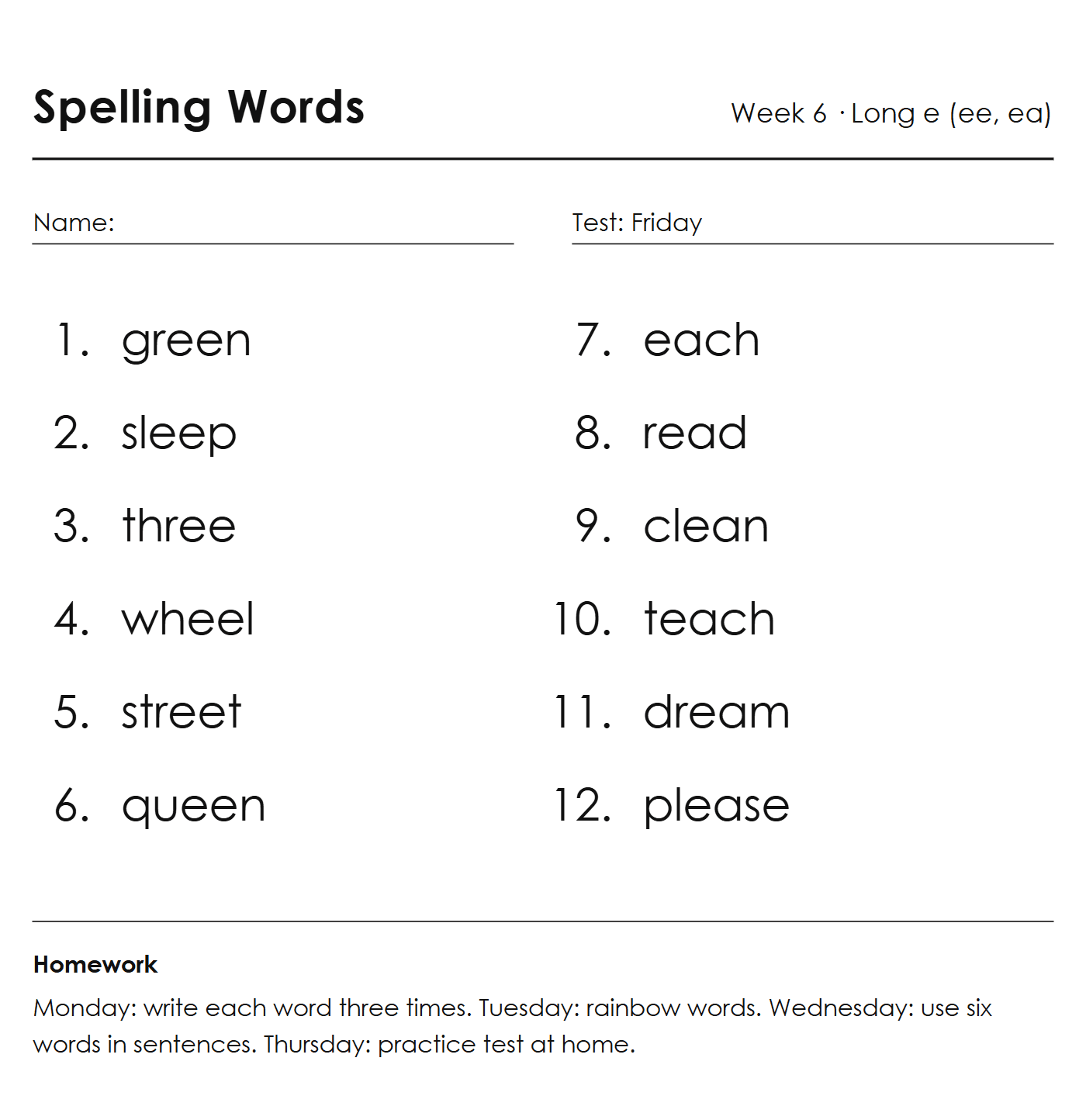
12 words found
1 word sounds like another word
- green
- sleep
- three
- wheel
- street
- queen
- each
- readTricky
- clean
- teach
- dream
- please
One photo starts the week.
Every week, the teacher sends a spelling list home. Photograph it once, and the practice takes care of itself.
- Scan
Monday: snap the list
The words are read from the photo and you check every one of them before your child sees anything. Misread a word? Fix it in a tap, or type the list in yourself.
- Practice
Each day: a short practice
Word, sentence, word: your child hears each word used in a sentence you approved, spells it, and sees right away how it went. A few minutes, on their own, no dictating from the kitchen.
What your child hears
Tap any word on the list
read.
We read a story every night.
read.
This is the voice in the app.
The sentence is what tells a word like "read" apart from "red" and "reed". You approve every sentence before your child hears it.
- Friday
Test day: no surprises
By Thursday evening, you both already know which words are ready. The test at school is just the last time through.
One number that matters.
Not points, not streaks: how many of this week's words your child can spell. You see it after every practice, so Thursday night is a glance, not a quiz.
Example: what you see on Thursday evening.
Thursday - 1 day to go
11 of 12 words ready
One more pass on "read".
Monday
0of 12
Wednesday
7of 12
Thursday
11of 12
An example week, one list of 12 words.
You stay in charge.
The account is the parent's, and the parent area is behind a 4-digit code. You approve every word and every sentence before your child practices them. You see the one number that matters: how many of this week's words are ready. Your child sees stars and encouragement, never a grade.
What SpellOwl does not do.
- No ads, ever.
- No birthdate, no age, no real name: a child profile holds a nickname and a school level, nothing else.
- No chat, no open text box, no way for a child to send a message to anything.
- We do not sell your data, or your child's.
Only a parent can create an account. Read the details in our privacy policy.
Built for your school.
For Kindergarten to 5th grade in the US, and Year 1 to Year 6 in the UK. Pick your school system at setup: grade or Year, the spelling vocabulary, and the voice follow. No list yet? Start from Dolch sight words, Fry words (301 to 500), or the National Curriculum word lists for England.
In the UK? Choose United Kingdom at setup and SpellOwl speaks your school's language: "Year 1" to "Year 6", KS1 and KS2, "practise your spellings", and a British voice. Snap the "weekly spellings" sheet; nobody types the list.
One subscription, the whole family.
Try everything free for 7 days. Then keep the ritual going.
Yearly
About 77 cents a week of practice.
$39.99/year
Monthly
Month to month, stop whenever.
$4.99/month
Up to 10 children on one account, each with their own list. The subscription renews automatically. Cancel anytime in your App Store or Google Play settings, at least 24 hours before the trial or period ends.
Questions parents ask.
What grades is SpellOwl for?
SpellOwl covers Kindergarten to 5th grade in the US, and Year 1 to Year 6 in the UK. You pick your school system when you set up the app, and the level names and the voice follow. The practice always uses the words on your child's own list, whatever the grade.
My child's teacher sends a list in an odd format. Will the scan read it?
SpellOwl reads the words from a photo of the list, then shows them to you as a plain list to check. Photograph one page at a time, flat and in good light. If a format does not read well, type the words in instead: the practice is exactly the same.
What if a word is misread?
Nothing reaches your child until you approve the list. Every scan ends on a review screen where you can fix a word in a tap, remove it, or add one the scan missed. You also see every practice sentence before your child hears it.
Does SpellOwl use my school's words or its own?
It uses your school's words: the exact list you photograph or type. SpellOwl only adds a short sentence for each word, which you approve. Ready-made lists (Dolch sight words and Fry words, National Curriculum lists for England) are there only if you choose them. More on this: A spelling app for this week's list from school.
Does SpellOwl work for sight words?
Yes, for spelling them. If your child's weekly test includes sight words, snap or type that list and SpellOwl practices it like any other list: it reads the word, a sentence, then the word again, and your child types the spelling. Ready-made Dolch lists cover Kindergarten to 3rd grade, and Fry lists (words 301 to 500) cover 4th and 5th grade. SpellOwl does not teach a child to read a word on sight; it practices writing it for the test.
Does it work with a homeschool spelling program?
Yes, if your program gives a list of words for the week or the lesson. Photograph the page from your teacher's guide or workbook, check the words, and SpellOwl reads each one, a sentence, then the word again, while your child types it. You no longer read the list aloud yourself. Set a test day or none at all, and give each child their own lists. Programs built on copying and dictating whole passages, without a word list, are not a fit.
Can my child use SpellOwl to practice the school spelling bee list?
Yes, for the spelling. Photograph or type the study list, up to 100 words per list, and SpellOwl reads each word, a sentence, then the word again while your child types it, the way a pronouncer gives the word. It does not give definitions or word origins and does not run the oral round, and words with accent marks are not supported. The study list itself comes from your school.
How long does practice take each day?
A few minutes. Your child goes through the week's words once: hears the word, a sentence and the word again, then spells it on the in-app keyboard. Short daily sessions work better than one long evening before the test.
Is my child's data safe?
The SpellOwl account belongs to the parent, and only a parent can create one. A child profile is a nickname and a school level: no birthdate, no age, no real name. There are no ads, no chat, and we do not sell anyone's data. The full list of what we collect, and who processes it, is in our privacy policy.
Does it work for UK spellings?
Yes. Choose United Kingdom at setup and SpellOwl uses Years instead of grades, UK vocabulary ("practise your spellings") and a British voice. The words are the ones your child's teacher sends home, spelled the way the school spells them.
What if the test is not on Friday?
Set the test date when you add the list: any day you like, or no date at all. The words-ready count runs up to that day. You can change the date later if the test moves.
Can siblings with different lists share one account?
Yes. One subscription covers up to 10 children, each with their own profile and their own lists. When you add a list, you choose which child or children it is for.
How much does SpellOwl cost after the free trial?
SpellOwl is free for 7 days with everything included, for first-time subscribers. After that it is $39.99 a year or $4.99 a month, bought through the App Store or Google Play, where your local price is shown before you confirm. You can cancel anytime in your store settings.
Can I cancel during the trial without being charged?
Yes. Cancel in your App Store or Google Play subscription settings at least 24 hours before the 7 days end, and you are not charged. If you cancel later, you keep access until the end of the period you paid for.